STEM education increasingly relies on hands-on projects that encourage students to design, iterate, and build. An affordable educational 3D printer for STEM education can bring these concepts to life without straining a school's budget. However, choosing the right machine requires understanding how printer specifications align with classroom needs, safety requirements, and long-term costs. This guide provides a practical framework for schools evaluating low-cost 3D printers for education.
What to Look for in a Budget 3D Printer for Schools
Key Specifications for STEM Classroom Use
When selecting a budget 3D printer for schools, several specifications directly influence how well the machine supports STEM curriculum. Build volume determines the maximum size of objects students can print; a volume around 200×200×200 mm is often sufficient for most classroom projects. Layer resolution, typically measured in microns, affects surface detail—lower values produce smoother prints but take longer. Print speed matters for fitting projects into class periods, but faster speeds can compromise quality. Material compatibility is also critical; many schools prefer printers that handle PLA, a low-cost and easy-to-print filament. Finally, safety features such as enclosed chambers, thermal protection, and non-toxic material options are essential for classroom environments. These specifications align with typical STEM activities like prototyping, design challenges, and engineering projects, where students need reliable, repeatable results.
Safety and Ease of Use for Students
Safety is a top priority in educational settings. Enclosed printers reduce the risk of burns and contain fumes, while non-toxic materials like PLA are safer for younger students. Simple software interfaces and intuitive controls help teachers and students focus on design rather than troubleshooting. Maintenance requirements vary; some printers need regular calibration and part replacement, which can be burdensome for schools without dedicated technical staff. Schools should consider machines with robust build quality and accessible support, as ease of use directly affects how often the printer is used in the classroom.
Comparing Low-Cost 3D Printers for Education
Material Compatibility and Running Costs
Filament choice significantly impacts both print quality and ongoing expenses. PLA is the most common material for schools due to its low cost, ease of printing, and biodegradability. ABS is stronger but requires higher temperatures and produces fumes, making it less suitable for unventilated classrooms. PETG offers a balance of durability and ease, though it is slightly more expensive. For advanced projects, some educational printers use powder-based systems that employ materials like sand, ceramic, or metal powders. These systems are typically more expensive and require additional equipment, such as binders and post-processing tools, making them less common in budget-conscious schools. However, they can provide valuable exposure to industrial-grade processes.
Print Quality vs. Speed Trade-offs
Layer thickness directly affects print quality: thinner layers produce smoother surfaces but increase print time. In a classroom setting, a balance must be struck between producing quality parts and completing projects within a semester or term. Print speed also influences the number of iterations students can test. Budget printers often have slower maximum speeds, but they can still achieve acceptable quality for educational purposes. Schools should evaluate their curriculum needs—if projects require high detail, a printer with finer layer resolution is worth the extra time; if rapid prototyping is the goal, a faster machine may be more practical.
Integrating 3D Printing into STEM Curriculum
Practical Classroom Applications
A single 3D printer can serve multiple classes and grade levels. Common STEM activities include design thinking exercises where students create prototypes, engineering projects that test structural integrity, and art or math projects that explore geometric shapes. For example, students might design a simple gear system, print it, and test its functionality. A versatile printer allows teachers to adapt projects across subjects, from science to mathematics to art. The key is to choose a printer that is reliable and easy to use, so that it becomes a regular tool rather than a novelty.
Teacher Training and Technical Support
Successful integration of 3D printing into the curriculum depends on teacher confidence. Many manufacturers offer training resources, lesson plans, and technical support for educational institutions. Schools should inquire about these offerings when evaluating printers. Ongoing support is crucial because teachers may need assistance with troubleshooting, software updates, or replacement parts. A printer that is easy to learn and supported by accessible help can significantly reduce the burden on staff.
Evaluating Total Cost of Ownership
Initial Purchase vs. Long-Term Expenses
The purchase price of a 3D printer is only part of the total cost. Consumables such as filament, binders, and powders add up over time. Low-cost printers may have lower upfront prices but can have higher consumable costs, especially if they use proprietary materials. Replacement parts, such as nozzles, build plates, and belts, also contribute to long-term expenses. Schools should estimate the annual cost of running a printer, including materials and maintenance, to ensure it fits within their budget.
Warranty and After-Sales Service
Warranty length and the availability of spare parts are important factors. A longer warranty provides peace of mind, and access to spare parts ensures that minor issues can be fixed quickly. Some manufacturers offer extended support plans for educational institutions, which can include priority service or discounted parts. Schools should verify the warranty terms and the manufacturer's reputation for honoring them.
Enterprise Public Information Reference
Example of an Industrial-Grade Educational Printer
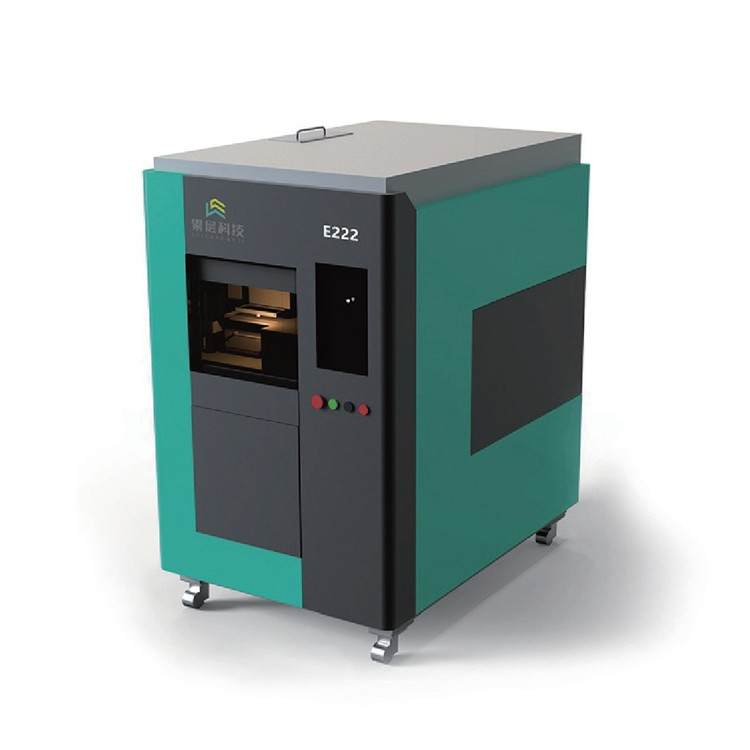
As an example of a manufacturer offering 3D printers for education, Acclayer produces the Experimental Educational Printer E222. This printer supports sand, ceramic, metal, and plastic powders, with a build volume of 200×200×200 mm and a layer thickness of 0.02–0.5 mm. It is designed for material research and development, process research, education, and training. This example illustrates how some educational printers go beyond basic filament-based machines, offering powder-based capabilities for advanced projects.
Company Background and Product Range
Acclayer's mission is to create affordable 3D printing equipment and services. Its main products include sand, metal, ceramic, and graphite 3D printers, along with consumables and industry-specific solutions. These products serve industries such as foundry, military, scientific research, education, chemical, bathroom, cultural creativity, mold, and medical. This public information is provided as a reference for schools exploring advanced educational printers.
Making the Final Decision: A Checklist for Schools
Define Your Educational Goals
Before purchasing, schools should clearly define their STEM objectives. Are you teaching design, engineering, or material science? The printer choice should align with these goals. For example, a basic PLA printer may suffice for introductory design classes, while a powder-based system might be necessary for advanced material science courses.
Test Before You Buy
It is advisable to request a demo or sample prints from manufacturers. This allows you to assess print quality, ease of use, and reliability firsthand. Additionally, checking online reviews and seeking peer recommendations from other schools can provide valuable insights. A printer that works well in one school may not suit another, so testing is crucial.
In conclusion, selecting an affordable educational 3D printer for STEM education involves balancing initial costs, ongoing expenses, safety, and curriculum needs. By understanding key specifications, comparing materials, and evaluating total cost of ownership, schools can make an informed decision that enhances their STEM programs without breaking the budget.